
Baby Panda's Town: Vacation
BabyBusEducational
3.926.00 Reviews
- Version
- 8.76.00.00
- Installs
- 10.00M
- Age Rating
- Everyone
Screenshots


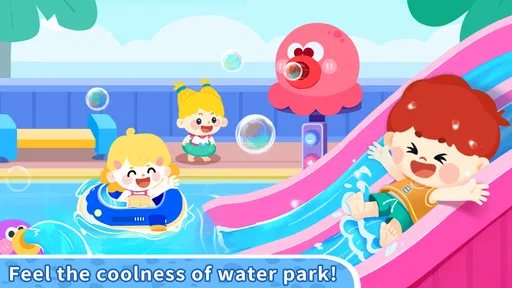

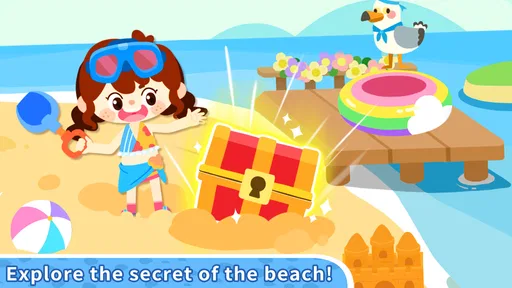

Our Review of Baby Panda's Town: Vacation
 Analysis by Appyee
Before choosing a game for a young child, I would ask what I want the screen time to do: offer a calm distraction, spark pretend play, or help with a specific skill. Baby Panda's Town: Vacation fits best in the first two roles. It is an educational game from BabyBus that turns a vacation setting into a collection of playful tasks for young children. My overall impression is positive: it is easy to enter, visually friendly, and better suited to short, guided play sessions than to long stretches of independent gaming.
The important distinction is that this is not an educational tool in the traditional lesson-and-quiz sense. It teaches through pretend play, exploration, and small interactions rather than through formal explanations. That makes it approachable for children who may lose interest in worksheets, but it also means parents should not expect a structured curriculum or measurable progress in a school subject. I see it as a gentle activity game with educational value, not as a replacement for a dedicated learning app.
What the vacation setting does well
The strongest part of the experience is its low barrier to entry. A child can understand the vacation theme quickly, recognize the friendly BabyBus presentation, and begin interacting without needing to read long instructions. That matters for younger players, especially those who are still developing reading confidence. The game’s Everyone age rating also makes its intended audience clear: it is designed to be broadly suitable for children rather than older players looking for challenge or competition.
In my experience, the vacation framing gives ordinary learning moments a more inviting context. Instead of presenting an isolated activity, it encourages the child to think about places, preparation, movement, and leisure as parts of one imaginative outing. That context can help a parent start a conversation: what would you pack, where would you go, what should you do before leaving, and how would you behave in a shared public space? The app works best when the adult occasionally joins that conversation rather than treating the game as a digital babysitter.
There is also value in the way the game allows a child to act rather than simply watch. Interactive choices can support basic decision-making, sequencing, and attention. Even when the educational objective is modest, the child is practicing the habit of noticing what is on screen and choosing an appropriate response. That is a more useful foundation for a preschool activity than passive animation alone.
One practical strength is its suitability for brief everyday moments. If I needed something to occupy a child while waiting at a restaurant, during a quiet afternoon at home, or before a real family trip, this would be more appropriate than a competitive action game. The vacation theme gives the session a natural beginning and end: play for a while, talk about the activity, then put the device away. That makes it easier to use intentionally.
BabyBus has also chosen a familiar presentation style that feels accessible rather than demanding. The developer is well known for children’s entertainment and learning products, and this game fits that family-oriented approach. The tone is cheerful without asking the player to master complicated controls. For a child who becomes frustrated by conventional games, that simplicity is a genuine advantage.
How I would use it with a child
A useful routine is to let the child explore first without interruption. After a few minutes, I would ask them to explain what they are doing and why. If the game presents a choice, I would avoid answering immediately and instead ask the child to predict what might happen. This turns a simple tap-based activity into a small exercise in language, reasoning, and memory.
Another effective approach is to connect the digital vacation to a real one. Before a family outing, a parent could use the game as a conversation starter about packing, waiting patiently, staying near an adult, and looking after personal belongings. The app cannot replace those real-world lessons, but it can make them less abstract for a young child. This is one of its more useful applications, and it is easy to miss if the game is judged only as a collection of screen activities.
I would also keep sessions short and stop while the child is still interested. The game is more successful as a repeatable little activity than as an all-day destination. A child can return to it later without needing a long explanation, while the parent avoids turning screen time into a battle. That rhythm suits the relaxed vacation idea better than trying to extract maximum playtime from it.
Where it feels less convincing
The same simplicity that makes the game welcoming can make it feel limited for children who want deeper challenges. Players looking for complex puzzles, character development, competition, or a strong sense of progression will probably outgrow it quickly. Its educational category should therefore be understood in a broad, play-based sense. It may support curiosity and basic thinking, but it is not the right choice for targeted reading practice, mathematics drills, language study, or a clearly staged academic program.
There is another trade-off in the vacation theme. It creates a pleasant setting, but a theme alone does not guarantee variety. Once a child understands the basic pattern of interacting with the scenes, some activities may lose their novelty. That is not necessarily a problem for a preschooler who enjoys repetition, but it can be noticeable for an older child or a player accustomed to games that constantly introduce new mechanics.
Parents should also pay attention to the commercial model. The game is free to install, but it includes optional purchases ranging from about two dollars to around forty-two dollars per item. That wide range makes it important to review purchase settings before handing over the device. I would not let a young child browse or tap through payment prompts without supervision. The free entry point is convenient, but families should decide in advance whether they are comfortable with any optional spending.
The current release is version 8.76.00.00 and requires Android 6.0 or later. That makes compatibility fairly broad for many Android devices, although an older phone or tablet may still provide a less comfortable experience depending on its screen and general condition. I would check the device before planning to use it on a trip, especially if the child relies on it for quiet entertainment away from home.
Its store performance suggests substantial reach, with over ten million installs, while the average rating sits at about 3.9 from roughly six thousand ratings. I read that as a sign of a recognizable children’s title with a mixed but generally workable reception, rather than as proof that it will suit every family. The smaller number of written reviews means I would place more weight on the game’s style and business model than on the rating alone when deciding.
How it compares with other choices
Compared with open-ended pretend-play games, this title is a more guided option: that can make it easier for a younger child to start, but it may offer less room for a child to invent their own long-running story. Compared with lesson-focused learning apps, its appeal is less about practicing one named school skill and more about making everyday ideas part of play. I would choose it when the goal is a gentle vacation-themed activity, and choose a focused learning tool when I need clear practice in reading or arithmetic.
A parent deciding between this and a video is choosing interaction over simply watching, though that does not automatically make every minute educational. I get the most from it by pausing to let the child explain a choice or relate a scene to an outing. If I need a genuinely screen-free break, a bag-packing game with household objects or drawing a holiday plan is a better fit; the digital version is most useful when the device itself is practical.
Who will enjoy it most
I would recommend it most strongly to families with young children who enjoy pretend play and need a calm, uncomplicated activity. It is particularly suitable for a child who likes colorful settings but is not ready for text-heavy games, or for a parent who wants to introduce tablet play without starting with fast reactions and competitive pressure. The free price makes it easy to try, provided the family is comfortable managing optional purchases.
It can also work well for siblings at slightly different stages, but with an important qualification: the younger child is likely to get more from the straightforward interactions, while the older one may need an adult to extend the activity with questions and real-world discussion. Without that extra layer, the older child may find the experience too easy.
I would be more cautious about recommending it to a child who needs a specific learning goal. If the priority is phonics, arithmetic fluency, handwriting, or a carefully tracked educational pathway, a specialized learning app would be a better investment of attention. Likewise, children who prefer open-ended building, story-rich adventures, or multiplayer games may not find enough depth here.
For a realistic use case, I can imagine opening it during a restaurant wait before a family outing. I would first check that the device is ready and that purchase controls are set appropriately, then let the child explore while we wait. If attention starts to drift, I would shift from tapping to conversation: ask what they would bring on a trip or what they would do next. That gives the activity a natural stopping point and avoids relying on the game to hold attention indefinitely.
Small choices that improve the experience
First, I would treat the game as a shared prompt rather than a standalone lesson. Asking the child to describe the vacation scene, name objects, or retell what happened adds language practice without making the session feel like homework. This is especially useful for children who speak eagerly during play but resist direct questioning.
Second, I would use it before a real outing rather than only during idle time. A child can play briefly, then help prepare a small bag or discuss the rules for staying safe in a busy place. The connection between the virtual setting and the real activity gives the game more educational weight than it has on its own.
Third, I would test the game myself before giving a child unrestricted access. That lets me see how the activities flow, identify any points where the child may need help, and make sure purchase controls are handled appropriately. With children’s apps, this short preparation is often more valuable than choosing a title based only on its screenshots or rating.
Finally, I would avoid presenting it as a reward that must be earned through perfect behavior. The game is better when it remains a relaxed creative activity. If it becomes tied too tightly to discipline or performance, the child may focus less on exploring and more on pleasing the adult. Its gentle design is an advantage, so I would preserve that atmosphere.
My final recommendation
Baby Panda's Town: Vacation is a pleasant, accessible educational game for young children, with its best qualities found in simple interaction, imaginative vacation play, and opportunities for parent-child conversation. I like it as a short-session choice for waiting rooms, quiet afternoons, or preparation for a family outing. It is easy to understand and unlikely to overwhelm a beginner.
My reservations are equally clear. The experience may not hold the attention of children seeking challenge, and it should not be confused with a structured academic tool. The optional purchases also deserve adult supervision, particularly because the available item prices extend from low-cost options to much larger purchases. Those points do not cancel out the game’s strengths, but they do define how I would use it.
For families wanting a friendly first step into children’s educational games, I think it is worth trying. I would recommend it with the expectation that its real value comes from guided play, conversation, and sensible limits on screen time. If that is what you want, this vacation-themed BabyBus game is a solid fit; if you need deep progression or focused school practice, I would choose a more specialized alternative instead.
Verdict
Strengths of Baby Panda's Town: Vacation
- Bright, child-friendly visuals make exploration appealing.
- Simple controls are easy for young children to understand.
- Vacation locations encourage imaginative role-play.
- Short activities suit brief play sessions.
- Offline access makes it useful during travel.
Limitations of Baby Panda's Town: Vacation
- Some content may feel repetitive after extended play.
- The youngest children may need help navigating menus.
- Limited challenge can reduce appeal for older kids.
- In-app purchases may be present depending on the version.
- Device storage and performance requirements can vary.
Other Releases by BabyBus
View All
Little Panda Policeman
Educational4.0

Little Panda's Chinese Recipes
Educational4.4

Little Panda's Restaurant
Educational4.4

Little Panda's Ice Cream Games
Educational4.3
Similar Picks in This Category
View AllLittle Panda Policeman
BabyBus4.0

Monster Trucks Game for Kids 2
Raz Games4.1
Little Panda's Chinese Recipes
BabyBus4.4
Little Panda's Restaurant
BabyBus4.4
Little Panda's Ice Cream Games
BabyBus4.3

Baby Panda Care
BabyBus3.8
Frequently Asked Questions
What is Baby Panda's Town: Vacation?
Baby Panda's Town: Vacation is a child-friendly pretend-play game where young players can explore holiday locations, interact with colorful characters, and take part in simple vacation-themed activities. The game focuses on discovery and creativity rather than competition, allowing children to move between areas, choose objects, and complete playful tasks at their own pace in a bright, cartoon-style environment.
Is Baby Panda's Town: Vacation suitable for young children?
The game is designed primarily for preschool and early-school-age children, with simple controls, cheerful visuals, and activities that do not require advanced reading or gaming skills. Most interactions are based on tapping, dragging, and exploring. Parents should still review the available content and play alongside younger children, especially because individual abilities and comfort with mobile devices can vary.
Does the game require an internet connection?
Baby Panda's Town: Vacation may allow some of its basic activities to be played after the necessary content has been downloaded, but certain features, updates, advertisements, or additional areas can depend on an internet connection. Availability may also differ between Android and iOS versions. For travel or offline use, it is best to open the game beforehand and confirm which content remains accessible without Wi-Fi or mobile data.
Are there advertisements or in-app purchases?
Depending on the version and platform, Baby Panda's Town: Vacation can include advertisements, optional purchases, or locked content that is presented through the game. Parents should check the store listing and device settings before handing the device to a child. Enabling parental controls, requiring authentication for purchases, and disabling unwanted mobile-data access can help prevent accidental taps or unexpected charges.
What are the main advantages and possible drawbacks of the game?
The main advantages are its approachable controls, colorful presentation, vacation-themed role-play, and open-ended activities that encourage imagination and exploration. It is generally easy for children to understand without lengthy instructions. Possible drawbacks include repetitive tasks, limited depth for older children, advertising or optional paid content in some editions, and differences in available features depending on the device, region, or installed version.
Play our best games!


